Site of Service: Viewing Supporting Data

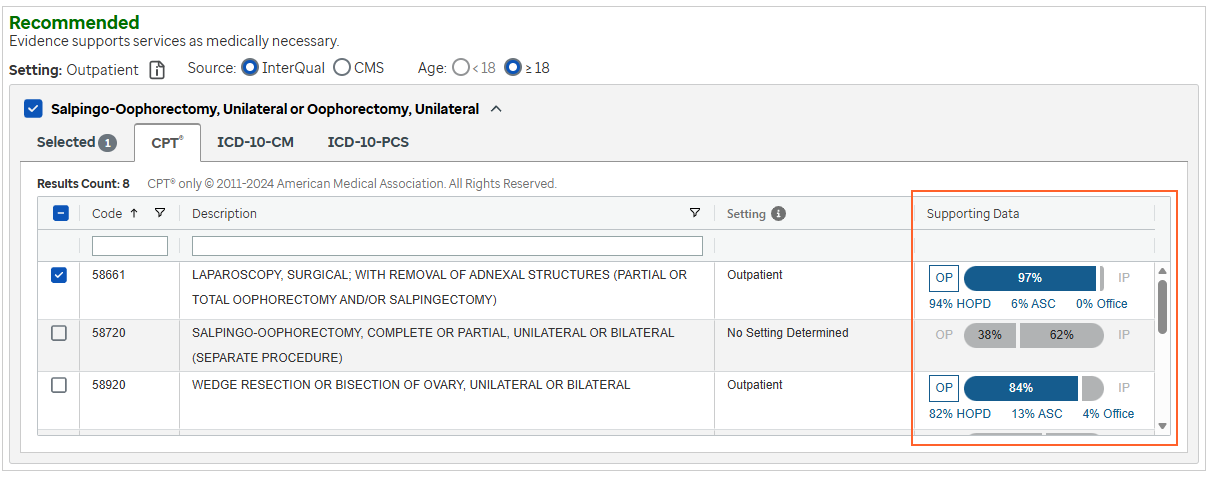
Site of Service includes data insights for inpatient and outpatient setting designations and ambulatory site-of-service benchmarks. Visualization of supporting data can help inform a setting designation that falls below the threshold of 75% and help guide organizations to direct procedures to the safest care setting. For example, the data can help a secondary reviewer make an informed decision when an inpatient level of care is requested but the data does not support that site of service.
- Select a subset with site of service data (Site of Service is available for CP: Procedures, Medicare Procedures, and BH: Services (select subsets) products.)
- Read the subset notes to get information about the subset.
- Select
 .
. - Answer the questions by reviewing each one as it appears and providing answers by selecting one or more options, as appropriate.
- Follow rules associated with the questions. Rules display in brackets next to the question (for example, [ ≥ One, except Other clinical information (add comment)] is a rule).
- If necessary, select Next to continue to the next question. Single answer questions automatically display the next question, while multi-answer questions display the Next button.
- View any notes associated with the questions by selecting the note icon.
- Answer all required questions. Required questions appear with the word Required in red text next to the question.
- When you reach the end of the questions, select
 .
. - Select the recommendation.
-
Select the relevant CPT® code(s) and view the supporting data visualization information. For detailed information on selecting CPT codes, see the steps for selecting CPT codes.
- Select
 and then continue with Viewing and Printing the Review Summary.